

Paint Dissolve
Paint Dissolve
Paint Dissolve
The visual goal was to create a controllable, unlit dissolve with a glowing emissive edge. Rather than default to fire or simple noise, I explored a melting iridescent paint aesthetic. The surface will liquefy and flow before vanishing entirely.
The visual goal was to create a controllable, unlit dissolve with a glowing emissive edge. Rather than default to fire or simple noise, I explored a melting iridescent paint aesthetic. The surface will liquefy and flow before vanishing entirely.
The visual goal was to create a controllable, unlit dissolve with a glowing emissive edge. Rather than default to fire or simple noise, I explored a melting iridescent paint aesthetic. The surface will liquefy and flow before vanishing entirely.
Type
UE5, Unlit, Paint, Dissolve
Type
UE5, Unlit, Paint, Dissolve
Shader Instructions
275
Shader Instructions
275
Figure 1: Video Demonstrating Shader Color Melting
Figure 1: Video Demonstrating Shader Color Melting
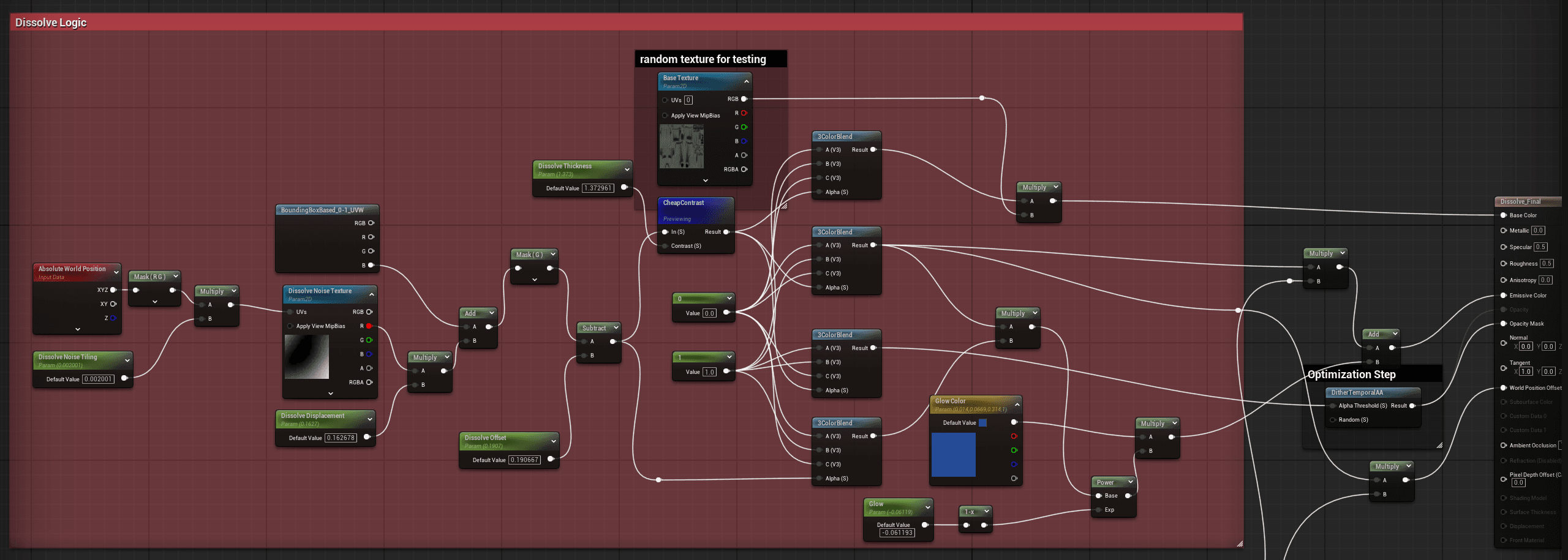
Figure 2: Snapshot of Shader Graph nodes responsible for the Material Melt
Figure 2: Snapshot of Shader Graph nodes responsible for the Material Melt
Dissolve Logic
Dissolve Logic
To solve the melting effect, I wanted to ensure that the dissolve would start from the top to bottom. This began with a bounding box based node, the blue channel is combined with a dissolve noise texture to distort the edge. The noise texture is multiplied by a dissolve noise tiling to give control of the UV seams to the artist. These are then separated into 3 color blends by using a cheap contrast node, creating the dissolved layer, the dissolving edge, and the material underneath. I added a node to account for glow for more customization before plugging the opacity mask into a Dither Temporal AA Node
To solve the melting effect, I wanted to ensure that the dissolve would start from the top to bottom. This began with a bounding box based node, the blue channel is combined with a dissolve noise texture to distort the edge. The noise texture is multiplied by a dissolve noise tiling to give control of the UV seams to the artist. These are then separated into 3 color blends by using a cheap contrast node, creating the dissolved layer, the dissolving edge, and the material underneath. I added a node to account for glow for more customization before plugging the opacity mask into a Dither Temporal AA Node
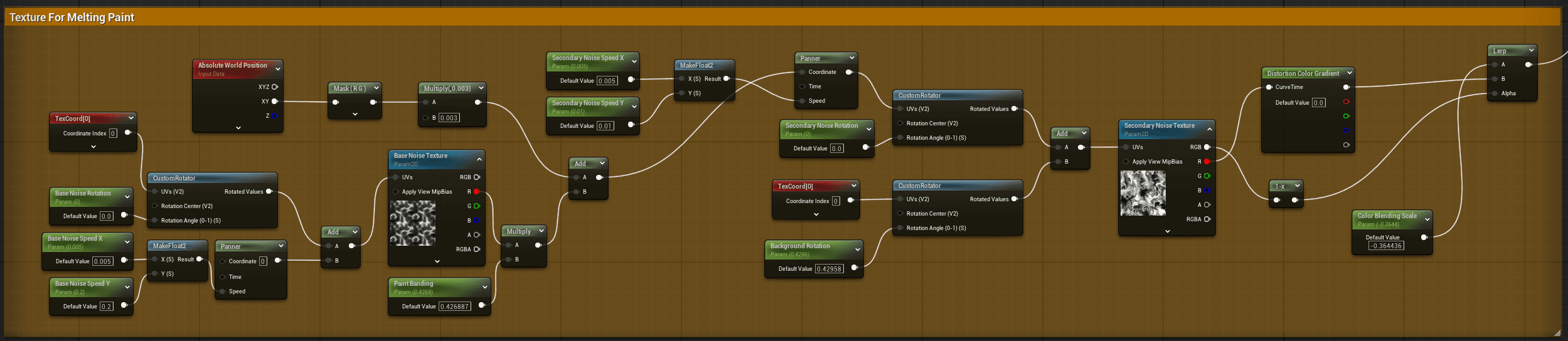
Figure 3: Snapshot of Shader Graph nodes responsible for Texture Layer
Figure 3: Snapshot of Shader Graph nodes responsible for Texture Layer
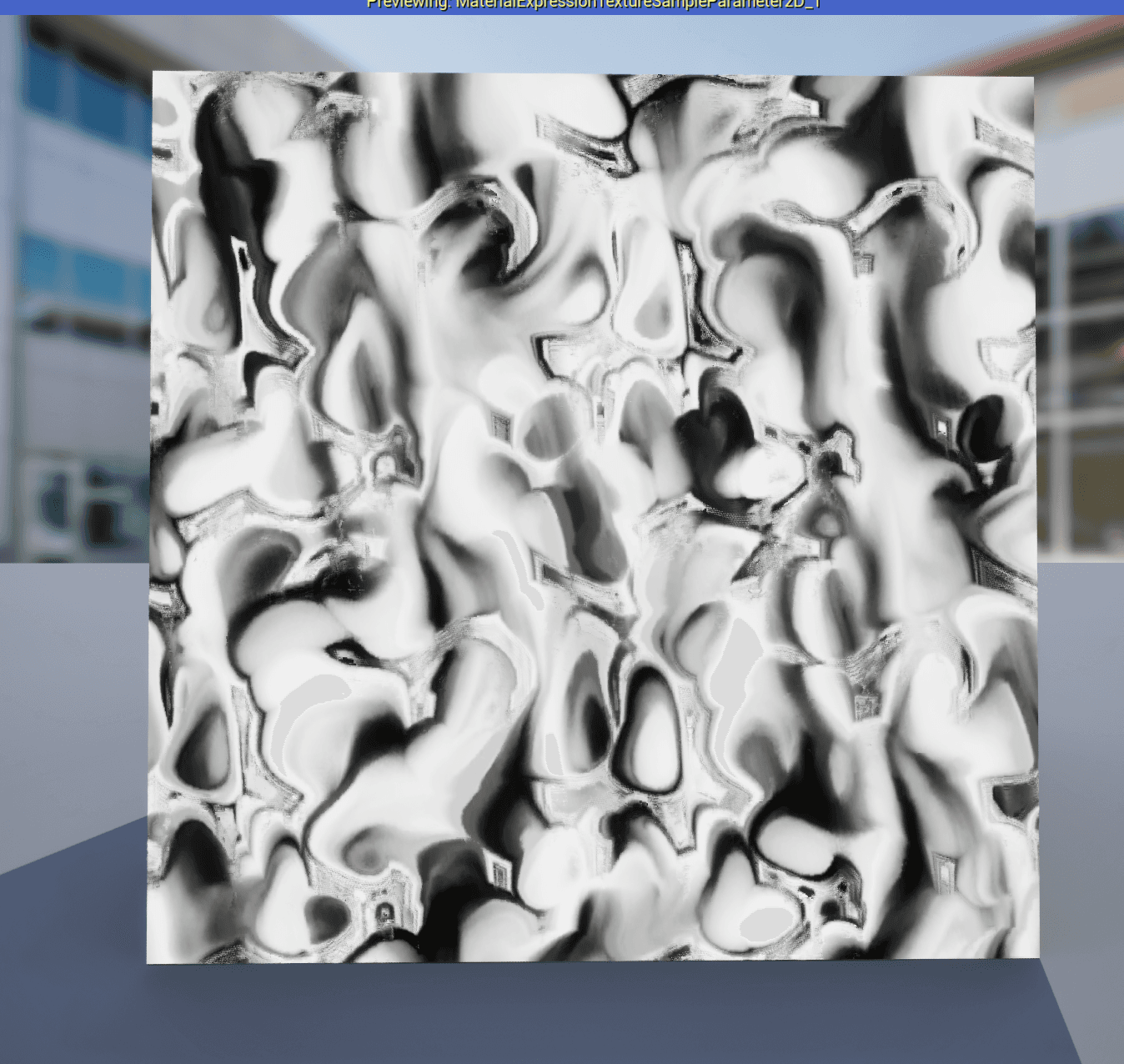
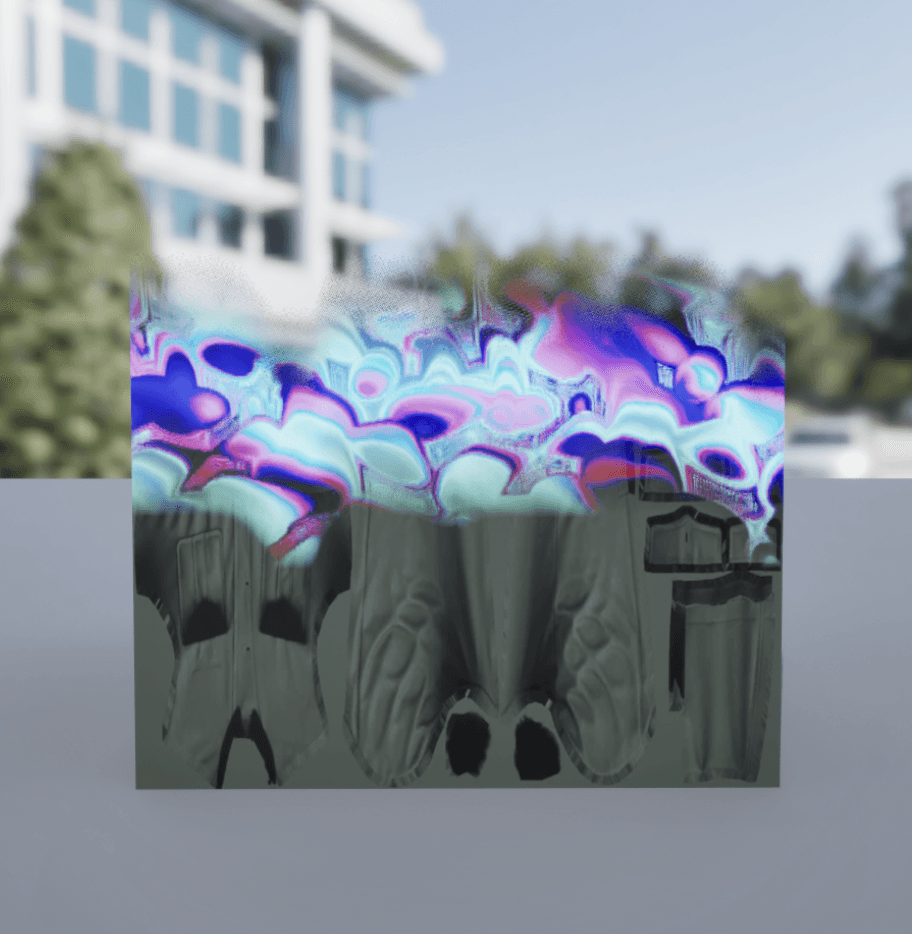
Figure 4: Snapshot of Resulting texture and its application on a Base Texture
Figure 4: Snapshot of Resulting texture and its application on a Base Texture
Paint Surface
Paint Surface
I was inspired by melting paint and overlapping colors so I started building the material with 2 texture samples, each with custom panning (controlled by artist). In rotating and panning the specific textures we’re able to simulate advection similar to a lava lamp. After the texture is rendered, I linear interpolate the inverse with a Color Curve (Gradient). The result is multiplied into the emissive node of the result. I added parameters to give the artist full control of the color gradients, panning speed, and noise textures. A Photoshop-style blend mode parameter added as a finish to give the artist control over how the layers interact.
I was inspired by melting paint and overlapping colors so I started building the material with 2 texture samples, each with custom panning (controlled by artist). In rotating and panning the specific textures we’re able to simulate advection similar to a lava lamp. After the texture is rendered, I linear interpolate the inverse with a Color Curve (Gradient). The result is multiplied into the emissive node of the result. I added parameters to give the artist full control of the color gradients, panning speed, and noise textures. A Photoshop-style blend mode parameter added as a finish to give the artist control over how the layers interact.
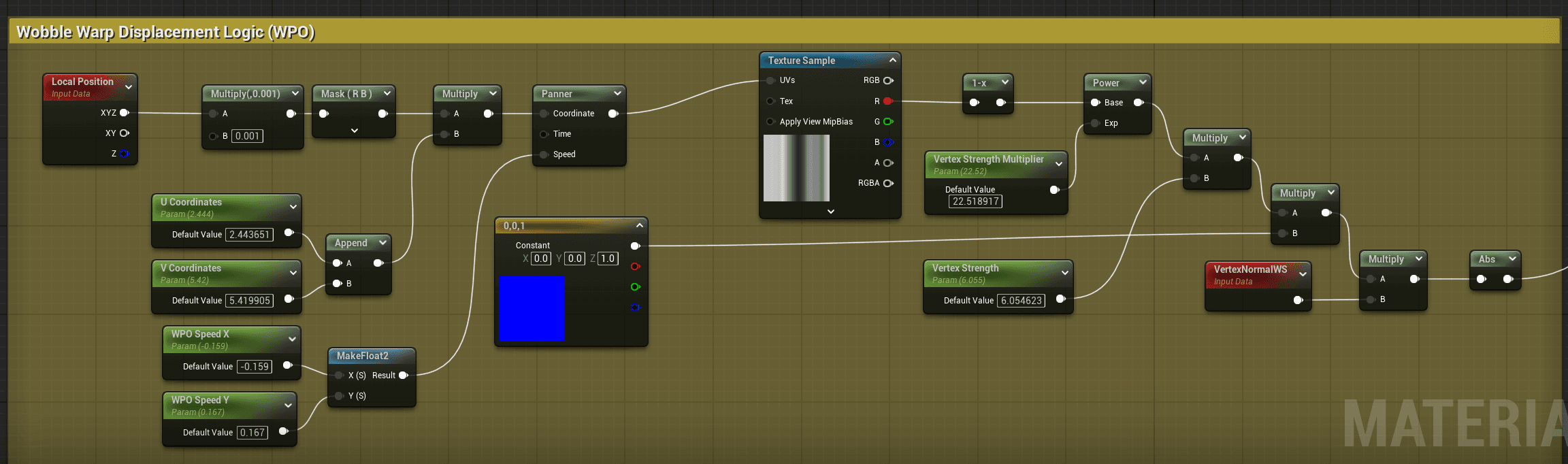
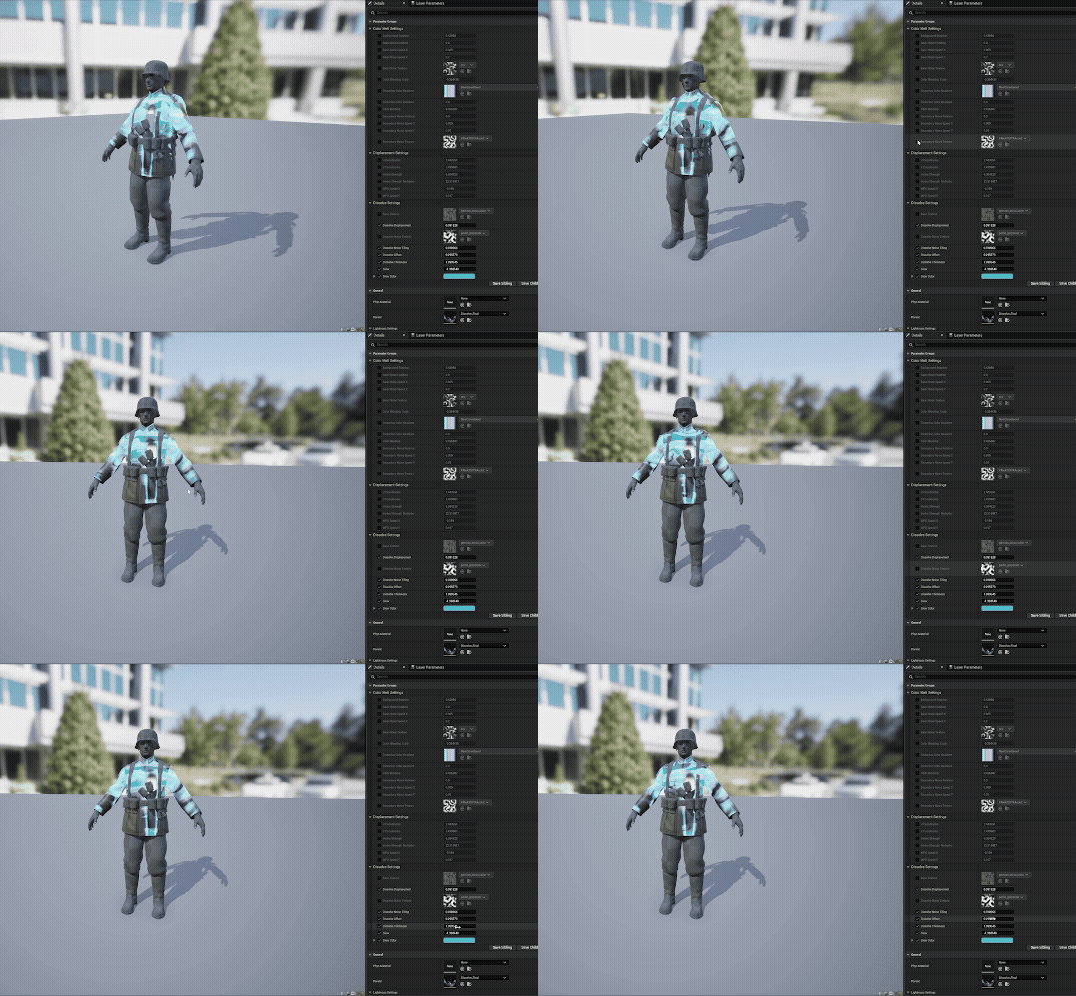
Figure 5: Snapshot of World Displacement Logic Nodes and resulting effect
Figure 5: Snapshot of World Displacement Logic Nodes and resulting effect
Wobble Warp Displacement
Wobble Warp Displacement
A separate noise texture sample drives World Position Offset to simulate the mesh losing structure as it melts. UV panning in both U and V channels creates a gel-like wobble. The artist has control of the wobble like animation by changing the coordinates (U and V) as well as the speed of the panning. I have two nodes responsible for the magnitude of the displacement, one is the strength scalar and the other is a strength multiplier (more powerful).
A separate noise texture sample drives World Position Offset to simulate the mesh losing structure as it melts. UV panning in both U and V channels creates a gel-like wobble. The artist has control of the wobble like animation by changing the coordinates (U and V) as well as the speed of the panning. I have two nodes responsible for the magnitude of the displacement, one is the strength scalar and the other is a strength multiplier (more powerful).
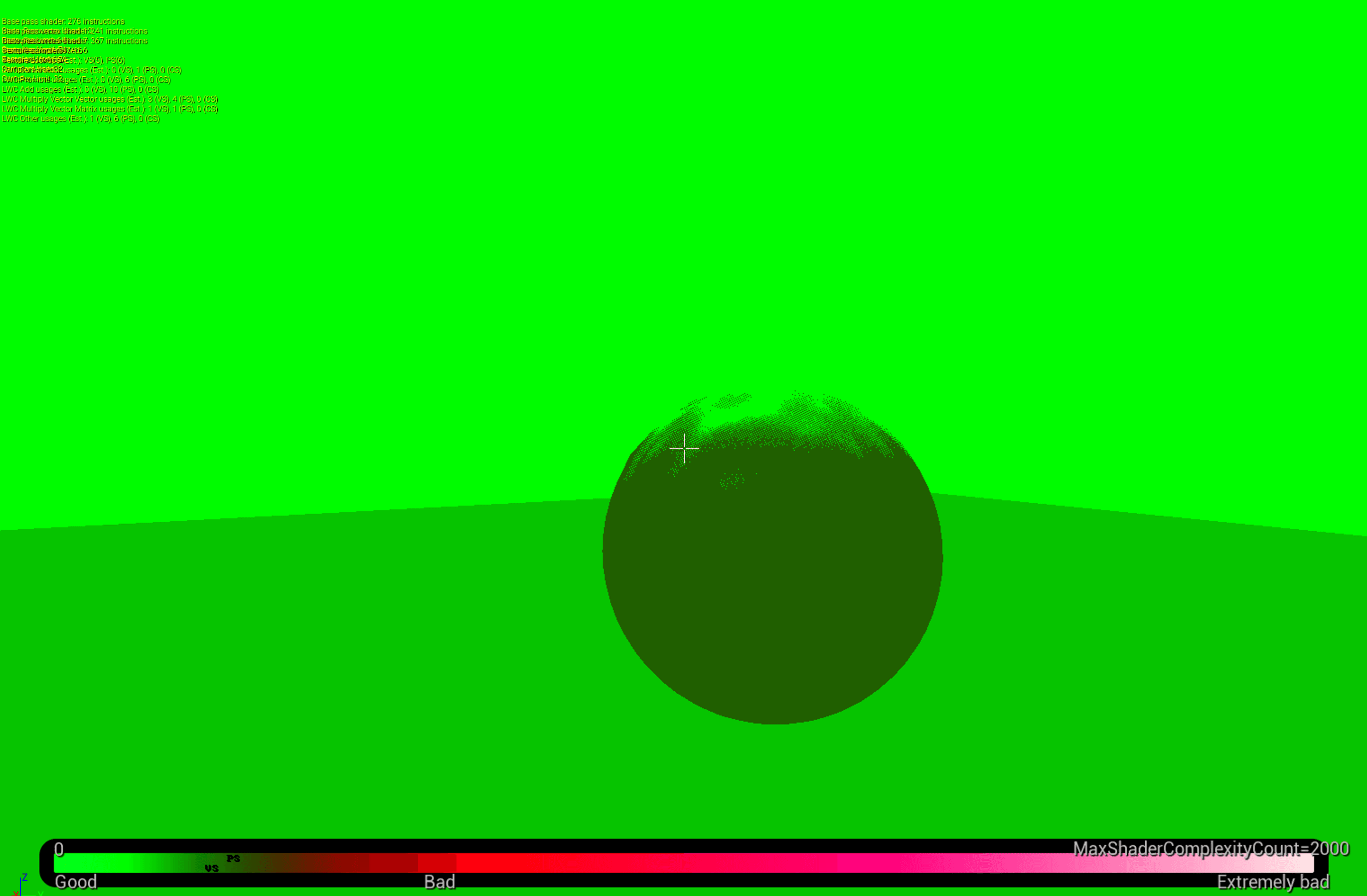
Figure 6: Snapshot of Shader Complexity of the Color Melt Material
Figure 6: Snapshot of Shader Complexity of the Color Melt Material
Optimization
Optimization
The shader is unlit, single-sided, and masked, with Temporal AA Dithering, avoiding the overdraw and blending issues that follow translucency in a deferred renderer. At 275 instructions it sits comfortably within desktop/console budgets.
The shader is unlit, single-sided, and masked, with Temporal AA Dithering, avoiding the overdraw and blending issues that follow translucency in a deferred renderer. At 275 instructions it sits comfortably within desktop/console budgets.
Thank You for Playing!




Thank You for Playing!
Thank You for Playing!
Thank You for Playing!
Thank You for Playing!
Thank You for Playing!